Showing posts with label BLOG POSTS. Show all posts

How to blog in your own unique style

Actually the ideas that the blogger shares with his/her readers is called blogging. All the success of the blog lies in these ideas.
Unfortunately most of the new bloggers just talk about those which all the blogger are talking about. They do not write ideas/opinions of their own. Why would readers come to those blogs who have the content that other popular blogs already have.
Visitors/readers need something unique and interesting. Here are some tips to make your blog posts unique from others.

  1. With a Pen and notebook Record your Ideas
    The most classic and a nice way to blog is to keep a pen and a notebook with yourself and write your thoughts and the ideas that strike you. Most of the ideas will be forgotten if you do not record them with yourself. And its very difficult to remember them back.
    Now when you sit to blog, it will be very easy for you to write post because you already got some ideas on your notebook.
  2. Do not Copy other Blogs
    Read other popular blogs to keep yourself upto date of what is happening in the blogosphere. Its also good to gain knowledge from them but do not try to copy their style and most important thing do not try to copy their posts ( unfortunately most of the most blogger do this mistake ). Listen people have already read these popular blogs, they do not want to read it on another blog.Visitors want something new and original. So please do not be their copy. Try to be Unique. However its ok to refer your readers to some interesting posts from other bloggers.

    Ades
    wrote a great point about copying someone else blog. "If you just want to repost what someone has posted then it’s better not to. Just remember people have already read about that!".

  3. Write your own opinions
    People usually read blogs because of author's personal opinions. Do not afraid to write your own opinions

    Ades also wrote about writing your opinions
    "Without the personal opinions, your blog will be just another news-reporting blog.
    Don’t be afraid of what people might think of your opinion, what is important is - what you think! And don’t forget that it’s your blog (not someone else’s) and in your own blog you are entitled to voice out your own opinions."
You might now be able to write your own posts in your own unique style.
Leave your comments please and if you want to add any thing in this list you can suggest in your comments.
Ten Tips for writing a blog post

The following post on tips for writing a blog was submitted by Lyndon from Flockblog

Here are tips that help me with my blog writing.

  1. Make your opinion known
  2. Link like crazy
  3. Write less
  4. 250 Words is enough
  5. Make Headlines snappy
  6. Write with passion
  7. Include Bullet point lists
  8. Edit your post
  9. Make your posts easy to scan
  10. Be consistent with your style
  11. Litter the post with keywords
1. Make your opinion known
People like blogs, they like blogs because they are written by people and not corporations. People want to know what people think, crazy as it sounds they want to know what you think. Tell them exactly what you think using the least amount of words possible.

2. Link like crazy.
Support your post with links to other web pages that are contextual to your post.

3. Write Less
Give the maximum amount of information with the least amount of words. Time is finite and people are infinitely busy. Blast your knowledge into the reader at the speed of sound.

4. 250 is enough
A long post is easier to forget and harder to get into. A short post is the opposite.

5. Make Headlines snappy
Contain your whole argument in your headline. Check out National newspapers to see how they do it.

6. Include bullet point lists
We all love lists, it structures the info in an easily digestible format.

7. Make your posts easy to scan
Every few paragraphs insert a sub heading. Make sentences and headlines short and to the point.

8. Be consistent with your style
People like to know what to expect, once you have settled on a style for your audience stick to it.

9. Litter the post with Keywords.
Think about what keywords people would use to search for your post and include them in the body text and headers. make sure the keyword placement is natural and does not seem out of place.

10. Edit your post
Good writing is in the editing. Before you hit the submit button, re-read your post and cut out the stuff that you don’t need.

Thats all
I hope you enjoyed my tips for writing a blog post - feel free to share your own blog writing tips below.

Want to Learn More about Blog Writing? Subscribe to Us

Adsense ads in Blogger post body


Using Blogger Feature:

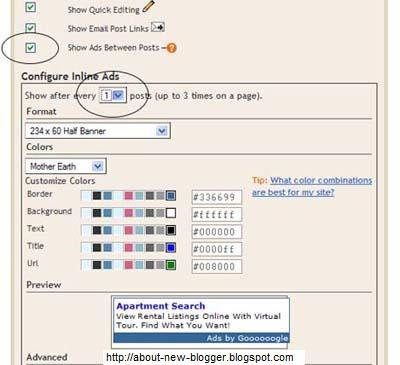
You can use Blogger's own feature of putting ads in between posts...
Go to Layout -> Page Elements... you would see "Blog posts" click the edit link at the bottom right corner.


You would need a Google Adsense . You will be assigned a publisher identity number which shall appear in all your adsense codes.....
Tick the "Show Ads Between Posts" .You can select whether to show ads after every post or after several posts.
Save and refresh your blog to see the ads...

More ad Locations:


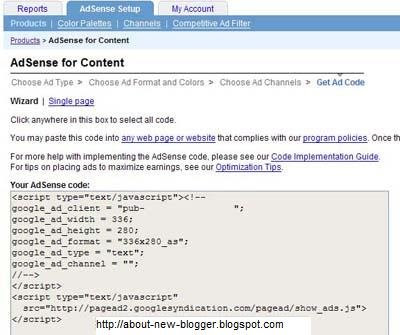
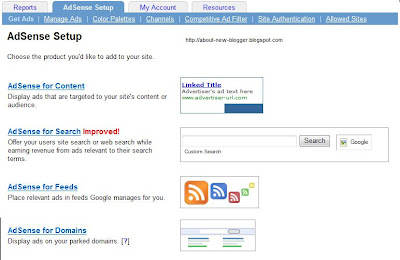
Go to Adsense For Content
Make Ad of your choice
You would get a Adsense Code


Changing the Adsense Code:

You Should replace some character

< with &lt;
> with &gt;
" with &quot;


Your Adsense code should appear like this...

&lt;script type=&quot;text/javascript&quot;&gt;&lt;!--
google_ad_client = &quot;pub-0000000000000000&quot;;
google_ad_width = 336;
google_ad_height = 280;
google_ad_format = &quot;336x280_as&amp;amp;quot;;
google_ad_type = &quot;text&quot;;
google_ad_channel = &quot;&quot;;
google_color_border = &quot;FFFFFF&quot;;
google_color_bg = &quot;FFFFFF&quot;;
google_color_link = &quot;000000&quot;;
google_color_text = &quot;000000&quot;;
google_color_url = &quot;000000&quot;;
//--&gt;&lt;/script&gt;
&lt;script type=&quot;text/javascript&quot;
src=&quot;http://pagead2.googlesyndication.com/pagead/show_ads.js&quot;&gt;
&lt;/script&gt;


Insert Code Into Template:

Go to Blogger Account and Layout -> Edit HTML
"Expand Widget Templates"

First Download your template before making any changes...

Now search for "post.body" you should see these lines
<div class='post-body'>
<p><data:post.body/></p>
<div style='clear: both;'/> <!-- clear for photos floats -->
</div>


If you want the ads to appear between your post title and post body, add the following code above the orange lines and if you want you your adsense code immediately after every individual post, add the following post below the orange lines.
The code to add is


 <div style='float:left; margin-left:30px'>
AdSense Code
</div>
Keep blogging!!!
if you like this post then please leave a comment or subscribe via RSS or Email.