Showing posts with label MONETIZE. Show all posts

Top 5 Ways to Monetize Your Blog

There are lots of ways to make money online. One great method is to start an engaging blog and be a thought leader in your niche. Some niches are very competitive such as gaming, tech, and finance but others might be quite uncompetitive.
As you’re building up your readership you’ll want to start thinking about ways that you can turn that traffic into money. The following five monetization methods are an excellent place to start:

  1. Ad sales

    You can sell ad directly on your blog. This cuts out the middleman and you can usually make more money than you could with just Adsense.
    Selling ads can be a much more time consuming monetization method because you may have to manage a lot of ads. If you only have a few ads then it might not be that difficult to keep track of your billing schedules. You also need to find advertisers that would pay for space on your blog. This can be difficult too; especially if your blog is new.

  2. Google Adsense & other contextual ad networks

    When people think about monetizing their blog the first thing they usually think about is Google Adsense. A lot of people have used Adsense to make money from their writing and it can work great if done right.
    Make sure you place your ads in locations that don’t look too spammy and make sure you’ve placed Adsense on the pages of your blog that are getting a lot of traffic. Adsense is likely the easiest of all of these monetization methods but it is also the lowest earner in many instances.

  3. Online affiliate programs

    If you have a blog with a decent amount of readers then you can get paid a commission every time those readers perform an action or buy something from another website. Affiliate marketing can be tough work because your business model is reliant on your visitors converting on another site. If you have enough traffic or enough highly converting traffic it might be easy but otherwise you may have trouble with online affiliate programs.

  4. Selling products

    This can sometimes be the hardest way to make money from your blog but it can also be the most profitable. If you already have a product to sell then a blog can be a very helpful marketing tool. Don’t fill your blog posts with self promotional garbage though. Write about things that people are interested in relating to the products you sell.
    Engage your readers. Make them laugh, give them useful information and advice, and give them a reason to come back often. It’s not easy but it can be very profitable.

  5. Selling services

    Creating an noteworthy blog can be a great way to find new clients. If you’re a web designer or photographer then your blog can showcase the work you do and the things that you’re interested in. A blog will give a potential client an idea of the type of person you are and the work that you are capable of.
There are the top 5 ways to help you monetize your blog. The best part about most of these methods is that you can test them out without having to commit longterm. See which methods are making you the most money and which ones might be best to avoid. Try moving your ads around your site and try to find the perfect placement to make money and keep your site looking clean and credible. Good luck with your blogging.

3 Reasons of not making profit from google adsense:


  1. Low Traffic:The more traffic you have the more your blog or website will be profitable and more are the chances to get good profit, they are simply directly proportional......
    If you are not having good traffic, less percentage of people will click your ads and you would not be able to get good income from Google Adsense...
    So in the primary goals add this point too, " increasing traffic.."
    some tips i provide will help you increase your traffic
    Add a 'share on facebook' link to blog
    Submitting Url to major search engines
    Submit Blog to Blog Directories
    Blog Walking
    Getting Free traffic from Yahoo Answers
    Link Exchange
    Optimize blog title for better SEO
  2. Ads placed poorly:
    Ads not placed in a nice area can also hurt your earnings....
    below is a graph here the dark colours are the best position for your ad placement
    Generally Large Rectangle is the best performing ad so far....
    try to blend the colours with your blog so that readers click on them by considering them as content of your blog....


  3. The Topic/Theme or content of your blog isn't conducing to make you earn money on adsense
    This is a main point please try to write about a profitable topic that make you earn money. Simply if you want to add Adsense to your personal blog then for sure you would not be able to earn money with that....
    Try to find a profitable Keyword/ a profitable topic and write about it...

    here is the keyword tool see and find good keywords for your blog and write about them on your blog... Keyword Tool

If you liked this post please leave a comment or subscribe to this blog via RSS or Email


Adsense ads in Blogger post body


Using Blogger Feature:

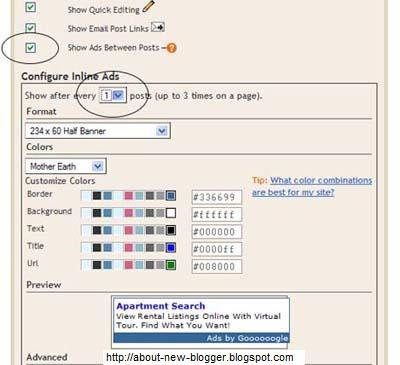
You can use Blogger's own feature of putting ads in between posts...
Go to Layout -> Page Elements... you would see "Blog posts" click the edit link at the bottom right corner.


You would need a Google Adsense . You will be assigned a publisher identity number which shall appear in all your adsense codes.....
Tick the "Show Ads Between Posts" .You can select whether to show ads after every post or after several posts.
Save and refresh your blog to see the ads...

More ad Locations:


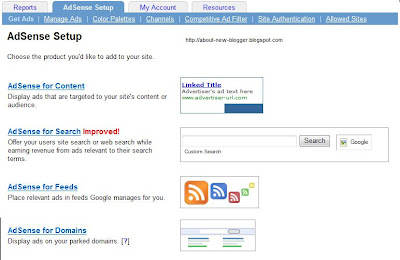
Go to Adsense For Content
Make Ad of your choice
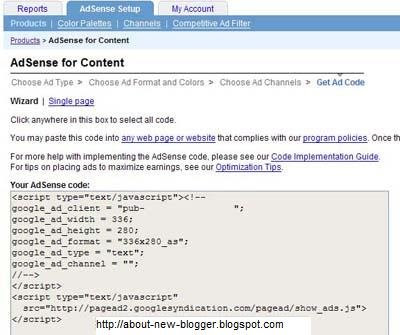
You would get a Adsense Code


Changing the Adsense Code:

You Should replace some character

< with &lt;
> with &gt;
" with &quot;


Your Adsense code should appear like this...

&lt;script type=&quot;text/javascript&quot;&gt;&lt;!--
google_ad_client = &quot;pub-0000000000000000&quot;;
google_ad_width = 336;
google_ad_height = 280;
google_ad_format = &quot;336x280_as&amp;amp;quot;;
google_ad_type = &quot;text&quot;;
google_ad_channel = &quot;&quot;;
google_color_border = &quot;FFFFFF&quot;;
google_color_bg = &quot;FFFFFF&quot;;
google_color_link = &quot;000000&quot;;
google_color_text = &quot;000000&quot;;
google_color_url = &quot;000000&quot;;
//--&gt;&lt;/script&gt;
&lt;script type=&quot;text/javascript&quot;
src=&quot;http://pagead2.googlesyndication.com/pagead/show_ads.js&quot;&gt;
&lt;/script&gt;


Insert Code Into Template:

Go to Blogger Account and Layout -> Edit HTML
"Expand Widget Templates"

First Download your template before making any changes...

Now search for "post.body" you should see these lines
<div class='post-body'>
<p><data:post.body/></p>
<div style='clear: both;'/> <!-- clear for photos floats -->
</div>


If you want the ads to appear between your post title and post body, add the following code above the orange lines and if you want you your adsense code immediately after every individual post, add the following post below the orange lines.
The code to add is


 <div style='float:left; margin-left:30px'>
AdSense Code
</div>
Keep blogging!!!
if you like this post then please leave a comment or subscribe via RSS or Email.