Showing posts with label ADSENSE. Show all posts

How to add adsense ads inside Blogger blog posts or between blog posts


Adding Adsense in between blogger posts can increase your CTR.
CTR means"(the number of times your ad clicked) divided by (number of times it is shown).So,the more CTR you have,the more you earn...

There are more chances for the ads to be clicked when they are in the middle(blog posts) rather than at the sidebars(especially the right sidebar),footer,etc.

An other tip to get High CTR is to place adsense ad under the post title...

For now
To place adsense in blogger posts

1. Sign in to your blogger account -> dashboard and click on layout

2. Click on the Edit link in the "Blog Posts' column
A pop up window opens

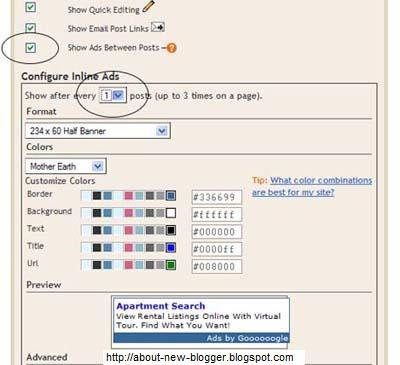
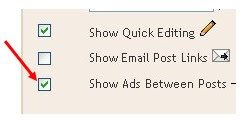
Check the box next to 'Show ads between Posts

configure the ads,choose the format,colours,etc and save the changes

That's it! Now your adsense ads will show between blog posts

If you want to know how to add the adsense ads inside the blog post rather than between the post, follow this:-

1. Sign in to your blogger dashboard>layout>Edit html
Check the box next to 'Expand Widget Templates'
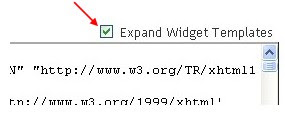
2. Scroll down the window till you see this code

<b:if cond='data:post.includeAd'>
<data:adEnd/>
<data:adCode/><data:adStart/>
</b:if>
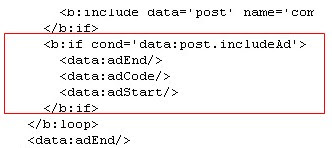

3. Replace that code in the template with the below code

<b:if cond='data:blog.pageType
!= "item"'>
<b:if cond='data:post.includeAd'>
<data:adEnd/>
<data:adCode/>
<data:adStart/>
</b:if> </b:if>


4.Again,scroll down the template and find out data-post body tag( look at below screen shot)
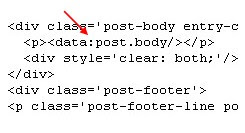

and paste the below code just above that code{this will show ads above the post body}.If you want ads to show below the post,paste the code below that tag.


Code:

 <b:if cond='data:blog.pageType == "item"'>
<b:if cond='data:post.includeAd'>
<data:adEnd/> <data:adCode/>
<data:adStart/> </b:if>
</b:if>
Done....

If you like this post then please leave a comment or follow this blog or subsrcibe to this blog via RSS
Thanks

Adsense Below Blogger post title

Many bloggers are wondering and trying to find that How to add Adsense below the blogger post title???
So i am now showing you the easiest way on how to add Adsense below post title in Blogger....


As you know that Google earnings depends upon your blog traffic and ad placement. One important place for adding adsense is below the post title.... There is more possibility to get clicks.

First of all login to your google adsense account and generate ad code

Now copy that code and put it in the box below and parse it..

Now Copy the parsed code
Login to blogger
-> Layout->>Edit HTML ->> expand the widget template
and find this code


<data:post.body/>
Replace it with the following


 <!-- http://blogger-new-widgets.blogspot.com Adsense Above Posts start -->
<b:if cond='data:blog.pageType == "item"'>
Put your parsed adsense code here
<br/>
</b:if>
<!-- http://blogger-new-widgets.blogspot.com Adsense Above Posts End -->
<data:post.body/>


You will see your ad appearing below the post title... ( this ad wont on Homepage and label pages )

happy earnings while enjoying blogging

If you like this post or you want to ask any question then please leave a comment
Thanks

3 Reasons of not making profit from google adsense:


  1. Low Traffic:The more traffic you have the more your blog or website will be profitable and more are the chances to get good profit, they are simply directly proportional......
    If you are not having good traffic, less percentage of people will click your ads and you would not be able to get good income from Google Adsense...
    So in the primary goals add this point too, " increasing traffic.."
    some tips i provide will help you increase your traffic
    Add a 'share on facebook' link to blog
    Submitting Url to major search engines
    Submit Blog to Blog Directories
    Blog Walking
    Getting Free traffic from Yahoo Answers
    Link Exchange
    Optimize blog title for better SEO
  2. Ads placed poorly:
    Ads not placed in a nice area can also hurt your earnings....
    below is a graph here the dark colours are the best position for your ad placement
    Generally Large Rectangle is the best performing ad so far....
    try to blend the colours with your blog so that readers click on them by considering them as content of your blog....


  3. The Topic/Theme or content of your blog isn't conducing to make you earn money on adsense
    This is a main point please try to write about a profitable topic that make you earn money. Simply if you want to add Adsense to your personal blog then for sure you would not be able to earn money with that....
    Try to find a profitable Keyword/ a profitable topic and write about it...

    here is the keyword tool see and find good keywords for your blog and write about them on your blog... Keyword Tool

If you liked this post please leave a comment or subscribe to this blog via RSS or Email


Adsense ads in Blogger post body


Using Blogger Feature:

You can use Blogger's own feature of putting ads in between posts...
Go to Layout -> Page Elements... you would see "Blog posts" click the edit link at the bottom right corner.


You would need a Google Adsense . You will be assigned a publisher identity number which shall appear in all your adsense codes.....
Tick the "Show Ads Between Posts" .You can select whether to show ads after every post or after several posts.
Save and refresh your blog to see the ads...

More ad Locations:


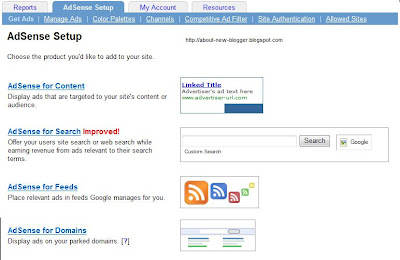
Go to Adsense For Content
Make Ad of your choice
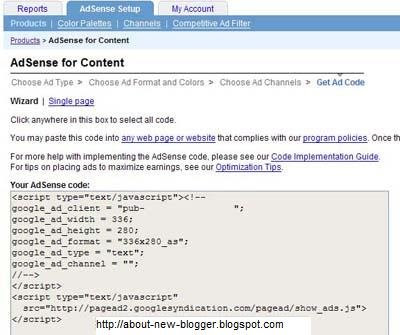
You would get a Adsense Code


Changing the Adsense Code:

You Should replace some character

< with &lt;
> with &gt;
" with &quot;


Your Adsense code should appear like this...

&lt;script type=&quot;text/javascript&quot;&gt;&lt;!--
google_ad_client = &quot;pub-0000000000000000&quot;;
google_ad_width = 336;
google_ad_height = 280;
google_ad_format = &quot;336x280_as&amp;amp;quot;;
google_ad_type = &quot;text&quot;;
google_ad_channel = &quot;&quot;;
google_color_border = &quot;FFFFFF&quot;;
google_color_bg = &quot;FFFFFF&quot;;
google_color_link = &quot;000000&quot;;
google_color_text = &quot;000000&quot;;
google_color_url = &quot;000000&quot;;
//--&gt;&lt;/script&gt;
&lt;script type=&quot;text/javascript&quot;
src=&quot;http://pagead2.googlesyndication.com/pagead/show_ads.js&quot;&gt;
&lt;/script&gt;


Insert Code Into Template:

Go to Blogger Account and Layout -> Edit HTML
"Expand Widget Templates"

First Download your template before making any changes...

Now search for "post.body" you should see these lines
<div class='post-body'>
<p><data:post.body/></p>
<div style='clear: both;'/> <!-- clear for photos floats -->
</div>


If you want the ads to appear between your post title and post body, add the following code above the orange lines and if you want you your adsense code immediately after every individual post, add the following post below the orange lines.
The code to add is


 <div style='float:left; margin-left:30px'>
AdSense Code
</div>
Keep blogging!!!
if you like this post then please leave a comment or subscribe via RSS or Email.