Showing posts with label Blogger Guide. Show all posts

Highlight Author's Comment in Blogger


This is a nice way to make your ( author's ) Comment different from all other comment that your readers left. Its is a very Interesting and useful Blogger tip..


1. Login to blogger, then choose "Layout --> Edit HTML". Don't forget to backup your template first.
2. Check the "Expand Widget Templates" box.
3. Copy this script and put it before ]]></b:skin> or copy to your CSS area.
.comment-body-author {
background: #E6E6E6; /* Background color*/
color: #000; /* Text color*/
border-top: 1px dotted #223344;border-bottom: 1px dotted #223344;border-left: 1px dotted #223344;border-right: 1px dotted #223344;
margin:0;
padding:0 0 0 20px; /* Posotion*/
}

4. Then find this code:

<dl id='comments-block'>
<b:loop values='data:post.comments' var='comment'>
<dt class='comment-author' expr:id='"comment-" + data:comment.id'>
<a expr:name='"comment-" + data:comment.id'/>
<b:if cond='data:comment.authorUrl'>
<a expr:href='data:comment.authorUrl' rel='nofollow'><data:comment.author/></a>
<b:else/>
<data:comment.author/>
</b:if>
said...
</dt>

<b:if cond='data:comment.author == data:post.author'>
<dd class='comment-body-author'>
<p><data:comment.body/></p>
</dd>
<b:else/>


<dd class='comment-body'>
<b:if cond='data:comment.isDeleted'>
<span class='deleted-comment'><data:comment.body/></span>
<b:else/>
<p><data:comment.body/></p>
</b:if>
</dd>

</b:if>

<dd class='comment-footer'>
<span class='comment-timestamp'>
<a expr:href='"#comment-" + data:comment.id' title='comment permalink'>
<data:comment.timestamp/>
</a>
<b:include data='comment' name='commentDeleteIcon'/>
</span>
</dd>
</b:loop>
</dl>


5. The orange color text is the code that you have to add to your script. The position must be right.
6. And then save your template


More about blogger tips
Getting readers for your blog from Yahoo Answers

Friends i wanted to share with you that you can also get alot readers and visitors from Yahoo Answers
I am having a yahoo id and i can use Yahoo answers... So simple. Now let me tell you how you can get visitors.... I simply know alot about Blogger and i use to search about question about blogger that people have asked recently, and then i use to answer them and leave an URL to my blog within that answer.
This is how i am now seeing that alot of visitors are refered by Yahoo answers...
So that is a nice tip, I wanted to share with you my friends

Keep blogging
Please if you liked this post please leave a comment or subscribe to this blog via RSS or Email.
Thanks

Adsense ads in Blogger post body


Using Blogger Feature:

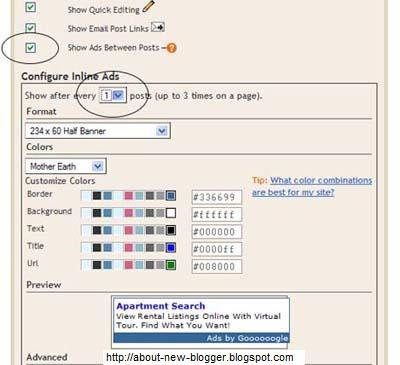
You can use Blogger's own feature of putting ads in between posts...
Go to Layout -> Page Elements... you would see "Blog posts" click the edit link at the bottom right corner.


You would need a Google Adsense . You will be assigned a publisher identity number which shall appear in all your adsense codes.....
Tick the "Show Ads Between Posts" .You can select whether to show ads after every post or after several posts.
Save and refresh your blog to see the ads...

More ad Locations:


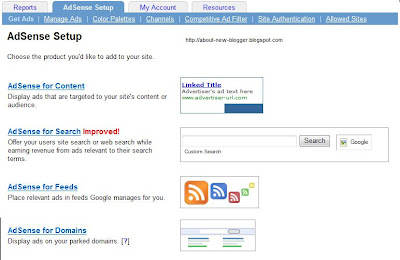
Go to Adsense For Content
Make Ad of your choice
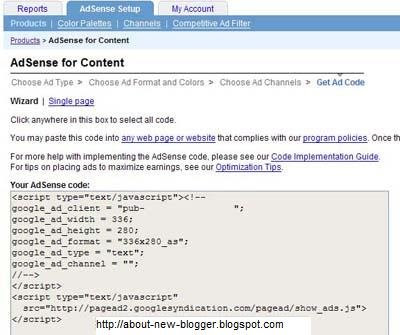
You would get a Adsense Code


Changing the Adsense Code:

You Should replace some character

< with &lt;
> with &gt;
" with &quot;


Your Adsense code should appear like this...

&lt;script type=&quot;text/javascript&quot;&gt;&lt;!--
google_ad_client = &quot;pub-0000000000000000&quot;;
google_ad_width = 336;
google_ad_height = 280;
google_ad_format = &quot;336x280_as&amp;amp;quot;;
google_ad_type = &quot;text&quot;;
google_ad_channel = &quot;&quot;;
google_color_border = &quot;FFFFFF&quot;;
google_color_bg = &quot;FFFFFF&quot;;
google_color_link = &quot;000000&quot;;
google_color_text = &quot;000000&quot;;
google_color_url = &quot;000000&quot;;
//--&gt;&lt;/script&gt;
&lt;script type=&quot;text/javascript&quot;
src=&quot;http://pagead2.googlesyndication.com/pagead/show_ads.js&quot;&gt;
&lt;/script&gt;


Insert Code Into Template:

Go to Blogger Account and Layout -> Edit HTML
"Expand Widget Templates"

First Download your template before making any changes...

Now search for "post.body" you should see these lines
<div class='post-body'>
<p><data:post.body/></p>
<div style='clear: both;'/> <!-- clear for photos floats -->
</div>


If you want the ads to appear between your post title and post body, add the following code above the orange lines and if you want you your adsense code immediately after every individual post, add the following post below the orange lines.
The code to add is


 <div style='float:left; margin-left:30px'>
AdSense Code
</div>
Keep blogging!!!
if you like this post then please leave a comment or subscribe via RSS or Email.

What's the reason for blogging??????

As i am blogging now i have a reason for blogging and that's i wana share my knowledge and help all my friends.... I am passionate about blogging and i love to share whatever knowledge i have about.....
These are my reason for blogging....
  1. Share Whatever You Want: Blog have flexibility, I can share anything with my readers, any knowledge i got, any experience i have about, Share pics i have interesting, videos which are helpful and interesting etc etc.....
  2. Blogs are easy to use: Blog are very easy to use nothing you have to learn about, Just make an account, Start blogging!!!!!
  3. More Friendships: Blogs are a great way to make communications to your visitors, When they leave comment or leave a chat box message....
  4. Get Revenue: It sounds great ahaaaan? When you are blogging for your interest and hobby and someone pays you? Yes by advertising on your blog you can earn a decent earnings, If you are having great content and useful content on your blog... then join PPC Ads like GOOGLE ADSENSE etc and start earnings
If you start blogging with a solid reason you would be able to be a Great Blogger.....

Blogger For Beginners

Keep Blogging
If you like this post then please leave a comment or subscribe to this blog via RSS or Email
Thanks

Getting High ranking in Google,, Yahoo and Major Search engines

Hi Friends,
  This BLOG is about only one month old but Thanks to Allah (the greatest of all) i am getting high number of uniques visitor and readers......
HOW........????????
    I am following some ways and tips.......
 I usually do Blog Walking and read other blog, I am coming to the point Remember whenever i read blog of other blogger i leave a comment on their post saying hi and introducing myself BUT leaving my BLOG URL in the comment .......
This is the main thing and it does not seem to be an important way to build you Search engine Ranking... BUT believe me its a very handy and useful way.....
Actually Search engines like GOOGLE , YAHOO etc Love this thing............. 

Isn't an easy step to build SEO ?

Other step that i have done is to Submit your Blog to All the major Search Engines ( like GOOGLE, YAHOO, MSN etc....)


this is also a great way to have One Way Link Exchange and its counted alot in getting high ranking in Search Engines...

Nextly while reading other blogs (related to your blog's Content) ask the other Blogger for Link Exchange 


Next..... Add a Digg button with every post

and

 Add a "Share On Facebook" Link at the end of your posts....

That's all 
Keep Blogging 
and hope you liked the post....
Reply

Submitting Url and Link Exchange

When your blog is ready, you want to have somebody who read your blog? Means you want readers?
Firstly when i made my site and it was ready with some good kind of post i submitted Urls to search engines like GOOGLE, YAHOO and All the Major Search engines  ( for Submitting Blog to Search Engines).... But on the other hand when i did and still doing Blog Walking i sometimes offer the another blogger to link Exchange... This is very important.....
Submitting Url to the Search Engines mean you are introducing yourself to the search engines and on the other hand link exchange is also a method of introducing yourself to the search engines... And in this way the blog Link Builds and Search Engine Ranking Increases.....

Hope Useful......

Blog Walking

I wanted to write about this post to let you know how we can increase our site visitor and readers?
To increase  that you should start "BLOG WALKING"... Blog Walking mean to read other peoples blog and spend some time on their blog BUT remember you should leave a comment on their blogs by saying Hey!! and introducing yourself and leaving your url.
This is a great way to find more readers to your blog...
If you find a blog of same content like your blog have then you can ask him for link exchange...
Link exchange is a like a friendship in the BLOGOSPHERE...
It can be fun for you and a great traffic of visitors to your blog.....

Keep Blogging

Add Digg button to Blogger

This is the step by step guide to show you how to add a Digg button to your Blog....
Digg is a social content website where your readers or you can submit content to. If you have a good story, members will 'digg' the post and write comments. As a blog owner, you may want to make it easy for and encourage your readers to submit and digg your articles.

Automatic Count and Vote Button

Before you do that though, you would want to take note of the following:-

1. Your blog should be set to save Post Pages. Post Pages are archived blog posts published to their own web page. Each post will have a unique URL, which is required by Digg for the individual posts to be submitted. To verify or enable it, login to your Blogger Dashboard. Under Settings-> Archiving, set the “Enable Post Pages?” to “Yes” and save the settings.

2. This template hack will put a Digg button to every post. You are therefore not able to choose which post you want to include or exclude a button. If you would prefer to have a Digg button added only to some posts, read the later part of this article on “Button for selective posts.”

3. The code reads the URL of the individual blog page and this shall be the URL used for submission of the story to Digg.

Under “Template”, click the “Edit HTML” tab. Block copy the entire HTML code for your site and save it in a text file. You can also click the "Download Template" link. This is one of the two necessary steps whenever you want to change the template. The second step is of course to “Preview” the new changes, and save the changes only when you are satisfied. The backup you have saved in a text file will come in handy when you accidentally click to save the changes without previewing them. With a backup, you can easily restore the template to the prior state if need be.

Click the box next to “Expand Widget Templates”. Scroll about two-thirds down the template to look for the code that reads:-

<p><data:post.body/></p>


If you want the button to show at the top right corner of your post, replace the above code with this.

<div style='float:right; margin-left:10px;'><script type='text/javascript'>digg_url="<data:post.url/>";</script><script src='http://digg.com/tools/diggthis.js' type='text/javascript'/></div><p><data:post.body/></p>


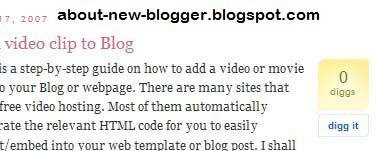
This is what you get:-


Please leave a comment if you like this post or subscribe to this blog via RSS or Email.

Add HTML, CSS, or Any script in Blogger Posts

I thought to post about Adding Scripts to Blogger posts as i think many of the people are facing problem, when they add a Html script to their post then that post after publishing comes to its layout........... to stop blogger from doing that you should do a simple and an easy step with your html.
Add < instead of < and > instead of >
For example
you i wanna add this html to blogger post

<p align="left"><form id="searchthis" action="YOUR BLOG URL/search" style="display:inline;" method="get">

I would change those starting and ending tags
like this:
p align="left" > form id="searchthis" action="YOUR BLOG URL/search" style="display:inline;" method="get"

Please leave a comment if you like this post or subscribe to this blog via RSS or Email.

Adding Blogger Search Box

Hi Friends...
This post is about adding a Blogger blog search box to your blog. Although Google Blogger have a Nav Bar at the top of blogs.... But if you want to add another search Box ( blogger search box) to the area of your then let me show you

Go to your Blogger account->Under Template->Page Elements tab, click “Add a Page Element” at the place where you want your search box to appear. Select “HTML/JavaScript”.There are several HTML codes posted on the net. I tried a few, and found the one that works as follows:-


<p align="left"><form id="searchthis" action="YOUR BLOG URL/search" style="display:inline;" method="get"><strong>NAME OF YOUR BLOG<br/></strong><input id="b-query" maxlength="255" name="q" size="20" type="text"/><input id="b-searchbtn" value="Search" type="submit"/></form></p>

Remember to change YOUR BLOG URL to the URL or web address of your Blog. Also, change the NAME OF YOUR BLOG to that which you want to call your site. For instance, if your Blog Name is long, you may want to write something like “Search Here” or “Search this site”.You can also change the “Search” button to say, “Hit” or “Go”, by changing the Value.Save the code and refresh your page. If you want a longer or shorter search box, you can play around with the size. The above example of a width size="20" and value="Hit" will give you this:-


Search Here


Whereas a width size="30" and value="Go" will give you this:-


search here

The size of the search box is a matter of appearance. You may have noticed that the maxlength="255". This indicates that a user may enter up to 255 characters in the search box, which I think is sufficient and need not be altered.


Please leave a comment if you like this post or subscribe to this blog via RSS or Email.